Turning an image to a 3D model online is free today, with no software download and no paid subscription required. AI-based single-image tools reconstruct a 3D mesh from one photo in under a minute, while multi-photo photogrammetry (building 3D geometry from several overlapping images of the same subject) and drone video extend the same image-to-3D-model idea to stronger accuracy and full-size scenes. This guide walks through every free path, from a single phone photo to a complete job site, and where each one hits its limits.
Key Takeaways
- SkyeBrowse's free Pocket 3D AI tool turns a single picture into a 3D model online, free, directly in the browser with no signup or software install
- Multi-photo photogrammetry produces more accurate 3D geometry than single-image AI generation, using free tools like SkyeBrowse Freemium, OpenDroneMap, and Meshroom
- Drone video scales the same image-to-3D-model process to an entire building or job site, returning a measurable model in about two minutes
- Accuracy spans from quick AI visualizations with no real measurement to 0.1 inch survey-grade precision on SkyeBrowse Public Safety & Enterprise
- Used across construction, insurance, and public safety wherever a photo-derived model must hold up to scrutiny
Contents
- How do you create a 3D model from a picture online for free?
- What is the fastest free way to turn a phone photo into a 3D model without software?
- How do you create a 3D model from multiple photos with photogrammetry?
- How do you go from image to 3D model for an entire building or job site using drone video?
- What professional use cases require a measurable 3D model from photos or video?
- How accurate are 3D models made from photos or drone video?
- How do you get started building your own 3D model from photos or video?
- FAQ
How do you create a 3D model from a picture online for free?
The fastest free path is a single-image AI generator: upload one picture, most often from a phone, and the tool reconstructs a 3D mesh you can rotate and download in under a minute. Multi-photo tools trade that speed for stronger geometric accuracy by triangulating several angles of the same subject. Drone video extends the same process to an entire building or site rather than a single object.
The workflow is the same regardless of which tool you use: capture one or more images of the subject, upload them to a browser-based tool, and let the software reconstruct the geometry. SkyeBrowse's free image to 3D model generator, Pocket 3D AI, handles the single-photo version end to end, while the multi-photo and drone-video paths below add the overlapping-angle geometry a single image can't provide, for models that need to carry real-world measurements.
What is the fastest free way to turn a phone photo into a 3D model without software?
Pocket 3D AI is SkyeBrowse's browser-based tool for turning a phone photo into a 3D model without installing any software. Take a picture, upload it at the tool's page, and the AI reconstructs a viewable 3D model in the browser, typically in under a minute. There is no account signup, no app download, and no desktop hardware requirement.
This path is built for speed. It works well for object scans, quick product visualizations, and informal documentation where a viewable model matters more than a surveyed measurement, since the reconstruction comes from a single viewpoint rather than triangulating multiple angles. Treat the output as a visual model, not a measurement source.
For subjects that need to be measured, walking around the object with a phone camera or flying a drone over a site captures the overlapping angles that photogrammetry and videogrammetry (the process of building georeferenced 3D geometry from video) use to calculate real-world scale and position.
How do you create a 3D model from multiple photos with photogrammetry?
Photogrammetry builds a 3D model from photos by matching overlapping features across many images of the same subject and triangulating their real-world positions. The more angles you capture, the more complete and accurate the resulting geometry. Free tools for this path include SkyeBrowse Freemium's cloud processing and open-source software such as OpenDroneMap and Meshroom.
SkyeBrowse Freemium is a free processing tier that builds a 3D model from a walkthrough or flyover video, the fast-motion equivalent of a large multi-photo capture, at basic resolution. There is no desktop software to install: upload an .MP4 or .MOV file at app.skyebrowse.com and the model is ready within minutes.
OpenDroneMap (packaged as WebODM) and Meshroom are the most widely used free, open-source tools for building a 3D model from a true still-photo set, both implementing standard structure-from-motion pipelines. Processing a 500-image dataset can take 30 to 90 minutes on a capable GPU workstation and involves manual configuration, so these tools suit surveyors and developers comfortable with a technical workflow. When a project needs precision beyond any free tier, SkyeBrowse Commercial and Pro reach 0.5 inch and Public Safety & Enterprise reaches 0.1 inch accuracy with a defensible processing log.
How do you go from image to 3D model for an entire building or job site using drone video?
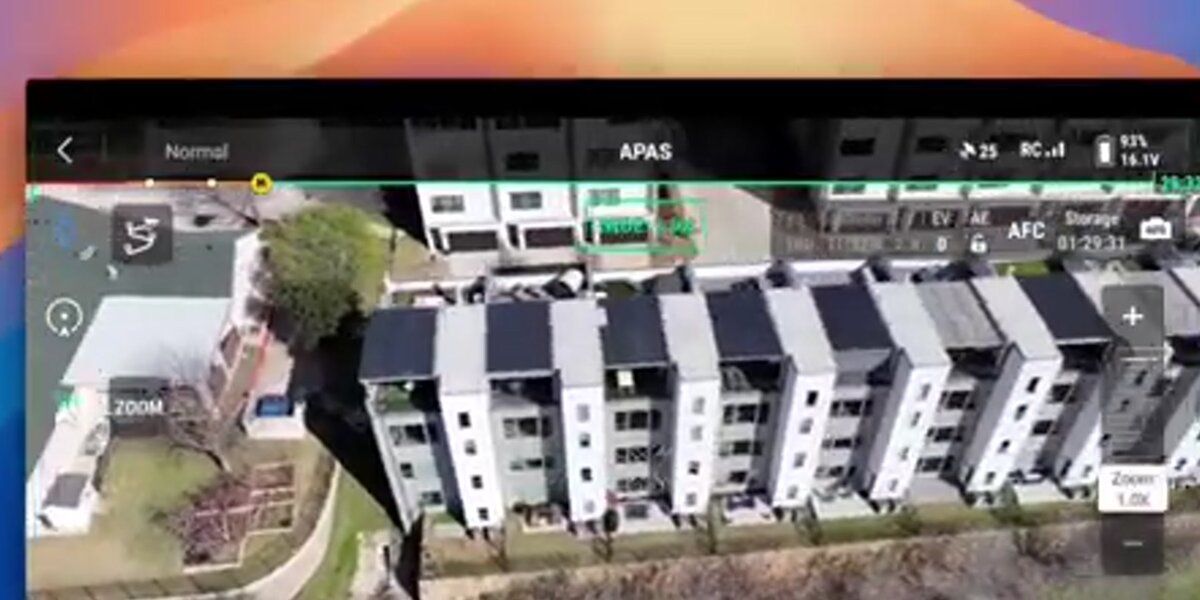
A drone orbits or flies a grid pattern over the site, capturing continuous video instead of individual photos. The software matches thousands of feature points across overlapping frames, triangulates their 3D positions, and builds a dense point cloud that gets meshed and textured into a navigable, georeferenced model, the same image-to-3D-model principle as a phone photo scan, scaled up to an entire structure.
Search for "image to 3D model" online and many results are AI art generators that infer a plausible shape from a single photograph, useful for creative renders but built for entertainment rather than measurement. A crash scene, a construction site, or an insurance claim needs geometry drawn from the real location, which is why drone-based capture is standard when a job site or building needs to be measured.
SkyeBrowse processes the full video rather than extracted still frames, preserving continuity and reducing the gaps that appear when images are sampled at long intervals. The operator uploads an .MP4 or .MOV file to app.skyebrowse.com; a telemetry sidecar file (.SRT from DJI, .ASS from Autel) improves georeferencing by encoding GPS coordinates and gimbal angle per frame. The cloud returns a textured 3D mesh (GLB), a georeferenced orthomosaic (GeoTIFF), and a point cloud (LAZ), typically within two minutes.
For the full capture-to-model walkthrough, see how to make a 3D model with a drone.

What professional use cases require a measurable 3D model from photos or video?
Construction project managers use 3D models to track earthwork volumes, verify as-built conditions, and document construction progress for milestone payments. Public safety agencies use them to preserve crash scenes, crime scenes, and fire scenes as permanent, court-admissible records. Insurance adjusters use overhead captures to document storm damage, slip-and-fall sites, and total-loss vehicles without repeated site visits.
Each of these workflows shares one requirement: the model must be measurable. A construction superintendent comparing two progress captures needs reliable volume calculations, and a traffic investigator testifying in court needs coordinates that match the official site survey. The ASPRS Positional Accuracy Standards for Digital Geospatial Data define the thresholds professional geospatial deliverables must meet.
SkyeBrowse serves over 1,200 agencies across public safety, construction, and insurance, providing a cloud-based path from a photo or drone capture to a professional-grade 3D model without desktop processing hardware, hosted on AWS in the United States at FedRAMP Impact Level 2 with full CJIS compliance on Public Safety & Enterprise. Public safety agencies operating under FAA programs like the UAS Integration Pilot Program have driven much of the demand for defensible, chain-of-custody drone data. See our best accident reconstruction software guide for how professionals choose courtroom-ready tools.
How accurate are 3D models made from photos or drone video?
Accuracy depends on the capture method and processing tier, not on whether the source is a photo or a video frame. Single-image AI tools produce a visual estimate with no real-world measurement. Multi-photo and drone-based structure-from-motion, without ground control points (GCPs), reach 1 to 3 inch relative accuracy at low altitudes; adding GCPs or RTK/PPK positioning can push absolute accuracy below 1 inch, meeting engineering and legal evidentiary standards.
SkyeBrowse offers three processing tiers calibrated to different accuracy requirements. Commercial at 8K resolution reaches 0.5 inch for rapid scene overviews and incident documentation. Pro adds exports and 1 year of storage for construction as-builts and insurance documentation. Public Safety & Enterprise at 16K with AI moving-object removal achieves approximately 0.1 inch, the tier used for accident reconstruction testimony. Accuracy scales with capture distance: flying closer or walking a phone camera nearer the subject reaches these same survey-grade numbers, whether the source is a photo set or a video.
For a detailed comparison against traditional survey methods, see total station vs. drone mapping and the ground control points guide. The distinction between still-image and video capture is covered in videogrammetry vs. photogrammetry.
How do you get started building your own 3D model from photos or video?
For a quick free model, take a picture and upload it to Pocket 3D AI, no account or software required. For a measurable model of an object or small space, capture multiple overlapping photos or a walkthrough video and upload it to app.skyebrowse.com or an open-source photogrammetry tool. For a full building or job site, fly any supported drone in an orbit or grid pattern and upload the video file; a model is ready within minutes.
SkyeBrowse is compatible with a wide range of consumer and commercial drones, listed at skyebrowse.com/supported-drones. The platform's tutorial library at skyebrowse.com/tutorials covers capture best practices by use case, and organizations needing enterprise pricing or custom integrations can request a quote at skyebrowse.com/quote.
For software comparisons across price point and use case, the drone mapping software guide covers the major options. Teams creating digital twins of buildings and infrastructure can use these same photo- and drone-derived models as the foundation for their digital replica workflows.

FAQ
How do I create a 3D model from a picture online for free?
Upload a single photo to a free browser-based tool such as SkyeBrowse's Pocket 3D AI. No account or install is required, and the model is typically ready in under a minute. For a measurable result rather than a visual estimate, use a multi-photo or drone-video capture instead.
Can I make a 3D model from multiple photos?
Yes. Photogrammetry software matches overlapping features across many photos of the same subject and triangulates their positions into a 3D mesh. Free options include OpenDroneMap, Meshroom, and SkyeBrowse Freemium for video-based captures processed in the cloud.
Is there a free image to 3D model generator with no software or signup?
Yes. Pocket 3D AI runs entirely in the browser with no account or download. Take a picture, upload it, and the tool returns a 3D model you can view and share from the page.
How accurate are 3D models made from photos or drone video?
SkyeBrowse Commercial and Pro (8K) reach 0.5 inch, and Public Safety & Enterprise (16K with AI moving-object removal) achieves approximately 0.1 inch, suitable for legal and engineering workflows. GCPs or RTK telemetry further improve absolute positional accuracy.
Turn a photo into a 3D model. Upload a single photo to Pocket 3D AI and get a textured 3D model you can download, right in your browser.